



Home / Print Tri Fold Menus & Programs


We Print Your Design
Print Tri Fold Menus & Programs
- Regular price
-
$2.42 - Regular price
-
- Sale price
-
$2.42
Couldn't load pickup availability




🌿We Print Your Design
Tri Fold Cards in sizes suitable wedding and event programs, table number & Menu table tent cards, brochures, and more. They make a beautiful presentation for any occasion.
Upload your design, select your paper and print options and let us do the rest! Your tri-fold cards will be professionally printed, cut and scored on precision electronic equipment, carefully packaged, and shipped flat to arrive in perfect condition.
Need a Tri Fold size or paper that is not available on this listing? Contact us and let us know the details.
Start creating today and Make Something Beautiful®
Getting Started With Your Order
- Visit our 🌿Printing Services Guide for complete information regarding the printing process.
- Review the 🌿Print File Setup Requirements for our printing processes.
- Open a 🌿Customer Account for order history and ease of tracking.
- We recommend that you order a printed proof of your projects before placing a full order.
- Online paper swatches are only a guide. If you are unfamiliar with a paper type or color, we recommend ordering a paper sample. See 🌿Paper Collections for Printing.
Design File Requirements
General file requirements for professional full-color and white ink printing ensure that your designs are printed accurately and with the best possible quality.
🌿Print File Setup Requirements PDF
For complete information visit our 🌿Printing Services Guide
Paper Collection for Printing Your Design
Sizing Your Print Design File
Need a file size that is not listed, Contact Us and let us know the details.
How to Properly Size Your Print File
Print files need to be properly sized to ensure a proper fit for all elements of your design. Here are some important terms to know. You will see these terms on 🌿Print Product Template Files available for your information and download.
WHAT IS TRIM SIZE?
The Trim Size is the same as the finished size of your printed document.
➡️Trim Size for a 5 x 7 inch card = 5 x 7 inches
WHAT IS BLEED?
When your design prints to the very edge of the finished product, it will require "bleed". Bleed is the area of your design that extends .125 inches on all four sides of the trimmed size, which adds .25 inches to the width and height of your print file size.
WITH BLEED:
File dimensions are .25 inches greater than the trim size.
➡️5 x 7 inch document with bleed = 5.25 x 7.25 inches
An important note that adding bleed does not mean stretching your file to fit the extra space needed, as this will merely stretch your design and may still result in design elements being cut off. Bleed is a deliberate addition or extension of elements in your design that allows the print to extend up to the very edge of your document.
SAFE ZONE:
Safe zone resides within the cut line or trim size, and is .125 inches smaller than the trim size on all four sides of your document, or .25 inches smaller in width and length of the trim size. Text and images inside the safe zone will be printed on the final document. Items outside the safe zone may be trimmed off.
➡️Safe Zone for a 5 x 7 inch document = 4.75 x 6.75 inches
DESIGN BORDERS:
- Solid borders - borders that extend to the end of the trimmed edge - must be placed from inside the safe zone to the outside of bleed area to assure evenness.
➡️Solid Borders on the edge of a design must be designed with full bleed
- Borders placed inside the safe zone that are not meant to extend to the trimmed edge should print as designed.
TOLERANCE:
We utilize state-of-the-art digital printing presses and precision electronic cutters / creasers for most print jobs.
- Industry standard tolerances for printing range from ±0.010 to ±0.020 inches, but allow up to ±0.03125 inches (±0.8 mm).
- Registration and trimming tolerances may be slightly looser due to the nature of digital presses and mechanical equipment.
Print Product Templates
DIY Designing?
- Right click and save these templates to your computer.
- Overlay the template in your design file to provide visual safe zone, trim line and bleed margins.
- Be sure your overall design file is the correct size before adding the template as it may snap to a different size.
- Hide or delete the template before saving your pdf.
BELLY BANDS
🌿Belly Band 1.875 x 11.25 Inches
🌿Belly Band 2.0 x 11.25 Inches
🌿Belly Band 2.25 x 11.25 Inches
PLACE CARD / ESCORT CARDS
🌿Folded 3.5 x 2.5 Placecard (3.5 x 5)
🌿Variable Merge Excel Template - Placecards
FLAT CARDS - Portrait Orientation - Rotate File 90° for Landscape
HALF-FOLD CARDS - PORTRAIT
🌿Half-Fold 4.25 x 5.5 A2 Portrait (8.5 x 5.5)
🌿Half-Fold 6.25 x 4.5 A6 Portrait (6.25 x 9)
🌿Half-Fold 5 x 7 A7 Portrait (10 x 7)
HALF-FOLD CARDS - LANDSCAPE
🌿Half-Fold 5.5 x 4.25 A2 Landscape (5.5 x 8.5)
🌿Half-Fold 4.5 x 6.25 A6 Landscape (9 x 6.25)
🌿Fold 5 x 7 A7 Landscape (7 x 10)
TRANSLUCENT VELLUM WRAPS
🌿Wrap No Overlap 5.125 x 7.00 (10.25 x 7)
🌿Wrap With Overlap 5.5 x 7.00 (11 x 7)
GATE FOLD CARDS
🌿Gate-Fold 4.25 x 5.5 A2 (8.5 x 5.5)
🌿Gate-Fold 4.5 x 6.25 A6 (9 x 6.25)
TRI FOLD CARDS
🌿Tri-Fold 3.5 x 8.5 (10.5 x 8)
ENVELOPES
How To Design for White Ink & White Ink CMYK
ALL WHITE INK OPTION (Easy Level)
-
This is the simplest way to print in white ink—no spot channels, no advanced software needed.
- White Ink Only Prints your entire design (shapes, graphics) using white ink exclusively. You can use varying percentages of white—from light/tinted effects to 100% opaque—for creative control.
- White Text We recommend text to be 100% black (100% K). Avoid very thin or small text.
File Setup Requirements
- Design your file using black ink only (100% black = 100% white ink on press).
- Text should be 100% black
- No spot colors or special channels required.
- Submit as a standard CMYK PDF.
For step-by-step instructions and examples, download the detailed PDF guide.
| Your file looks like this: | Your envelope looks like this! |
 |
 |
🌿Printable PDF-Designing for White Only
WHITE INK + CMYK (Advanced Level)
- White Ink 100% + CMYK –
Prints 100% opaque white behind all CMYK elements (except true black areas). This underlay preserves color vibrancy and prevents the paper from showing through colored inks.
- White Ink Varied % + CMYK
Gives full control: Apply varying percentages of white ink as standalone elements or selectively behind specific CMYK areas. You decide exact placement and opacity levels.
Important Note:
- Advanced white ink requires proper file setup (e.g., spot channels for white). It is not compatible with our complimentary variable data merge service.
- For detailed setup instructions, including software-specific steps, download the PDF guide.
Choosing Paper For Photo Cards
Different paper finishes offer advantages and considerations; understanding these can help you achieve the desired outcome.
Whether you prioritize vibrant colors, a professional aesthetic, or a classic matte look, there’s a paper type suited to your needs. Below, we explore the most common options to guide your choice.
Details
-
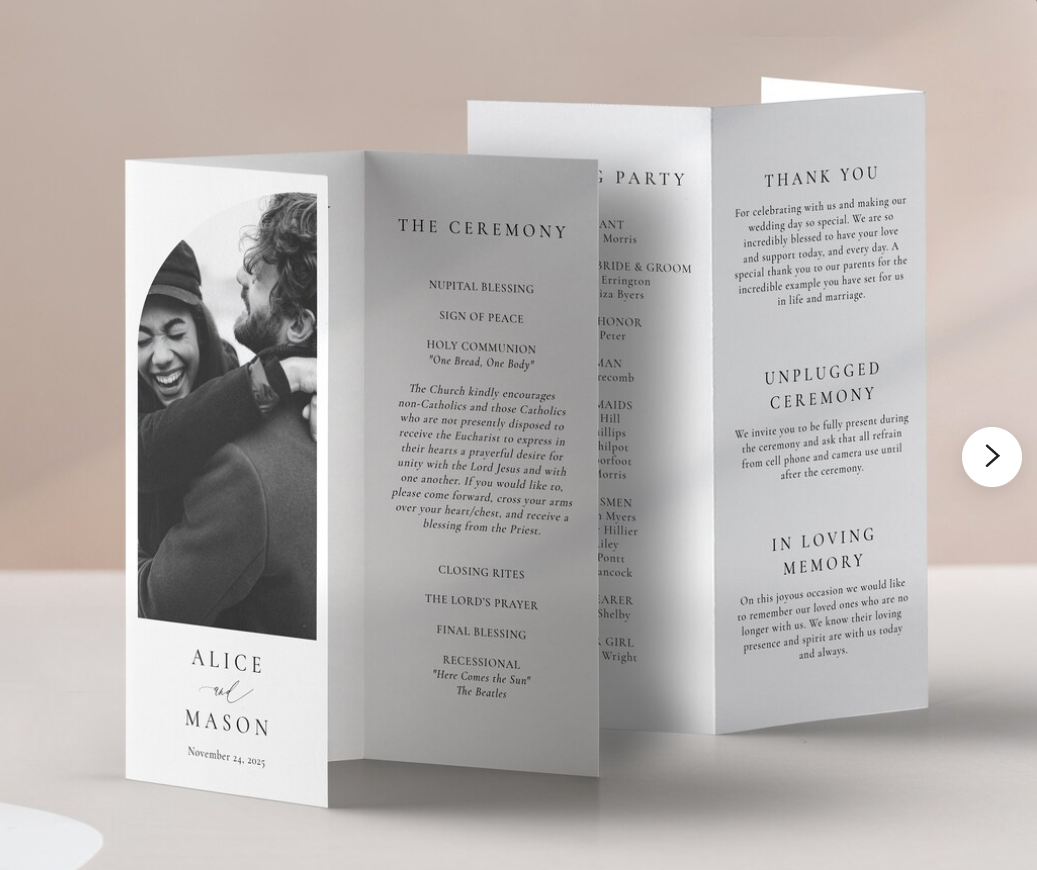
Tri Fold Cards
Tri Fold Card suitable for wedding and event programs, table number & menu table tent cards, brochures, and more. They make a beautiful presentation for any occasion.
Works as a Z fold, letter fold, or as a triangular table tent.
See our Paper 101 Guide for additional information on wedding invitations, printing, die-cutting and more.
Not sure about the cardstock color or weight? Interested in swatches of all of our papers? Order our Professional Swatch Deck. Hold the paper in your hands, feel it, mix and match colors. We highly recommend you order a paper sample prior to ordering paper for special events, especially when matching colors or for print testing.
Start creating today and Make Something Beautiful®
-
Sizes
- 3.5 x 8.5 inches
3.5" width on each of 3 sides x 8.5" tall
Ink Color: Options for Black, Full CMYK Color and White Ink. Note: printing color ink on colored paper will change the appearance of ink colors. A printed proof is recommended before ordering.. Please make sure the correct options are selected,
Other: Solid-core - Archival - Fade Resistant - Acid, Lignin, Heavy Metal, and Chlorine Free
Environmental: 100% Recyclable and Biodegradable
Make Something Beautiful
-

Wedding and Event Program
-

Table Info Card
-

Add Matching Place Cards


